This is WIT class We are Engineers we are students
Dhanujay.k
Still there are so many important tags like : Table tag Marquee tag Subscripts Superscripts Strike
let see the examples of marquee tag and table tags
To create Table we need three tags :
tr tag: It defines the table row and create a row of the table.
th tag: It defines the table heading and used to create a heading for tables
td tag: It defines the table data and used to insert the data into the table
s.no
Name
Designation
Department
1
k.Dhanjay
Assoc Professer
CSE
2
N.Siva
Student
CSE
3
k.Chinni
Student
CSE
We can insert even audio & video in webpages, by using below tags:
img tag :
TO insert images
auido tag :
TO insert audio clips
video tag :
TO insert video files
What is CSS ?
CSS stands for Cascadding style sheet.
It describes how HTML elements should be displayed
CSS Syntax :
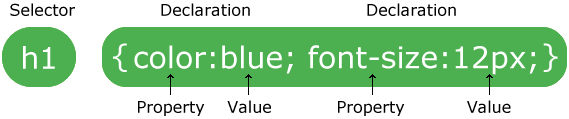
+ The selector points to the HTML element you want to style.
+ The declaration block contains one or more declarations separated by semicolons.
+ Each declaration includes a CSS property name and a value, separated by a colon.
+ Multiple CSS declarations are separated with semicolons, and declaration blocks are surrounded by curly braces.
CSS SELECTORS
Element selector
Univeral selector
Class selector
Id selector
Three Ways to Insert CSS
External CSS
External styles are defined within the link element, inside the head section of an HTML page
Internal CSS
An internal style sheet may be used if one single HTML page has a unique style.
The internal style is defined inside the style element, inside the head section.
Inline CSS
An inline style may be used to apply a unique style for a single element.
To use inline styles, add the style attribute to the relevant element. The style attribute can contain any CSS property.
CSS Borders
The CSS border properties allow you to specify the style, width, and color of an element's border.
The border-style property specifies what kind of border to display.
The following values are allowed:
dotted - Defines a dotted border
dashed - Defines a dashed border
solid - Defines a solid border
double - Defines a double border
groove - Defines a 3D grooved border. The effect depends on the border-color value
ridge - Defines a 3D ridged border. The effect depends on the border-color valu
inset - Defines a 3D inset border. The effect depends on the border-color value
outset - Defines a 3D outset border. The effect depends on the border-color value
none - Defines no border
hidden - Defines a hidden borde
CSS BOX MODEL :
In CSS, the term "box model" is used when talking about design and layout.
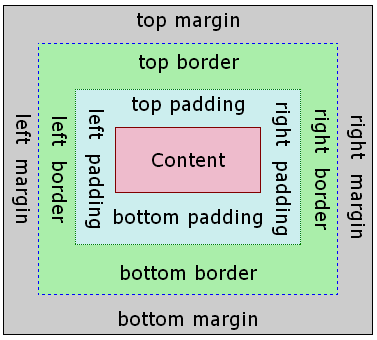
The CSS box model is essentially a box that wraps around every HTML element. It consists of: margins, borders, padding, and the actual content. The image below illustrates the box model:
Explanation of the different parts:
Content :- The content of the box, where text and images appear
Padding :- Clears an area around the content. The padding is transparent
Border :- A border that goes around the padding and content
Margin :- Clears an area outside the border. The margin is transparent
======Task for the day======
Movie rating
UPPENA
CSS Rounded Corners:
With the CSS border-radius property, you can give any element "rounded corners".
border-radius - Specify Each Corner.
The border-radius property can have from one to four values. Here are the rules:
Four values - border-radius: 15px 50px 30px 5px; (first value applies to top-left corner, second value applies to top-right corner, third value applies to bottom-right corner, and fourth value applies to bottom-left corner):
Three values - border-radius: 15px 50px 30px; (first value applies to top-left corner, second value applies to top-right and bottom-left corners, and third value applies to bottom-right corner):
Two values - border-radius: 15px 50px; (first value applies to top-left and bottom-right corners, and the second value applies to top-right and bottom-left corners):
One value - border-radius: 15px; (the value applies to all four corners, which are rounded equally:
CSS Links
In addition, links can be styled differently depending on what state they are in.
The four links states are:
a:link - a normal, unvisited link
a:visited - a link the user has visited
a:hover - a link when the user mouses over it
a:active - a link the moment it is clicked
Next version of Hyper Text Markup Language (HTML4)
It is Developing by W3C ( Wolrd Wide Web Consortium) and WHATWG.(Web Hypertext Application Technology Working Group)
what is the difference between the HTML5 and HTML4 ?
No multimedia support without third party. where html5 provides it as inbuilt elements like audio,video,canvas. like this there are many things that HTML5 features.